When recording into your computer with your pedal steel or 6 string guitar and using recording software like, KRISTAL or PRO TOOLS is a audio interface like the Focurite Saffaire 6 Audio Interface USB needed?
What does an interface actually do for your recording. What else do you need.
PS - I'm new to recording with the computer.
Ken
Computer Interface for Recording
Moderator: Shoshanah Marohn
-
Kenneth Kotsay
- Posts: 952
- Joined: 8 Jan 2000 1:01 am
- Location: Davie/Ft Lauderdale, Florida
-
Jack Stoner
- Posts: 22146
- Joined: 3 Dec 1999 1:01 am
- Location: Kansas City, MO
For best results you do need a recording interface of some sort. A PC sound card's input levels require near line level, where a guitar or guitar effects only output a very low "instrument level". Some PC sound cards do not have the needed drivers (usually ASIO drivers) so those will not even be detected by some recording programs.
Most recording interface units will accept both instrument level and Mic level. Some will also accept a line level. Recording interfaces also have headphone monitoring capabilities.
Many manufacturers make small two channel recording interface units. MAudio (Avid), Focusrite, Presonus, Roland, Tascam, etc.
If you are using Pro Tools, many versions will only work with a proprietary interface unit (MAudio). The latest Pro Tools 10 (and older 9 but NOT MP9) will work with SOME non proprietary interfaces. If you are using most other recording programs such as Sonar, Cubase, Reaper, etc, they will work with virtually any brand of recording device.
Most recording interface units will accept both instrument level and Mic level. Some will also accept a line level. Recording interfaces also have headphone monitoring capabilities.
Many manufacturers make small two channel recording interface units. MAudio (Avid), Focusrite, Presonus, Roland, Tascam, etc.
If you are using Pro Tools, many versions will only work with a proprietary interface unit (MAudio). The latest Pro Tools 10 (and older 9 but NOT MP9) will work with SOME non proprietary interfaces. If you are using most other recording programs such as Sonar, Cubase, Reaper, etc, they will work with virtually any brand of recording device.
-
Dave Ziebarth
- Posts: 54
- Joined: 22 Aug 2006 12:01 am
- Location: Rockville, MD
To start, you just need a mic, mic stand, mic cable, recording software (I use Sonar) and some way to get the sound into your computer, like an interface. Most interfaces have XLR inputs and mic preamps to boost the mic signal to an acceptable level for recording, and as Jack pointed out some way to monitor your recording such as a headphone output. A 2-channel interface is fine, and allows you to record and mix multiple tracks limited only by the computing power of your computer. I use a relatively old M-audio Delta 66 http://www.m-audio.com/products/en_us/Delta66.html
which gives me 4 ins and 4 outs, meaning I can record 4 separate tracks at a time and play them back through 4 channels on my mixer. You don't need an external mixer, though - you can do all the mixing in your program and send the stereo mix to headphones or speakers. If I were upgrading today, I'd probably get the M-audio Profire 2626 which is 8 x 8 and has better pre-amps. To get a really good sound for vocals, acoustic guitar, steel, and esp. bass and drums, consider getting a decent condenser mic (Rode NT2A or better) and eventually a dedicated preamp like the Universal Audio LA610.
which gives me 4 ins and 4 outs, meaning I can record 4 separate tracks at a time and play them back through 4 channels on my mixer. You don't need an external mixer, though - you can do all the mixing in your program and send the stereo mix to headphones or speakers. If I were upgrading today, I'd probably get the M-audio Profire 2626 which is 8 x 8 and has better pre-amps. To get a really good sound for vocals, acoustic guitar, steel, and esp. bass and drums, consider getting a decent condenser mic (Rode NT2A or better) and eventually a dedicated preamp like the Universal Audio LA610.
-
Kenneth Kotsay
- Posts: 952
- Joined: 8 Jan 2000 1:01 am
- Location: Davie/Ft Lauderdale, Florida
Thanks for the info guys, I already downloaded KRISTAL which was free, (I might download,Audicity in the future) it took me sometime to get it going but I finally was able to record my electric acoustic guitar going directly into my computer. (mic connection). Played it back & it sounded very good.
For the steel, I hooked it into a Lexicon MXP 100, then I hooked the Lexicon into my computer, I then recorded my steel and played it back, it sounded O.K. In fact I sound better recorded than live, HOW COME?????? I was totally amazed at the sound of my steel, & that was without using an amp, Nash 1000.
If I use a interface what result will I get when I go direct from my steel into the interface then into the computer recording program.
I been to Guitar center and they carry lots of interface, ranging from $159.00 to over $400.00.
Do I use an amp or the Lexicon with the interface.
Also I have a Mackie mixer, not the big one but a small version.
For the steel, I hooked it into a Lexicon MXP 100, then I hooked the Lexicon into my computer, I then recorded my steel and played it back, it sounded O.K. In fact I sound better recorded than live, HOW COME?????? I was totally amazed at the sound of my steel, & that was without using an amp, Nash 1000.
If I use a interface what result will I get when I go direct from my steel into the interface then into the computer recording program.
I been to Guitar center and they carry lots of interface, ranging from $159.00 to over $400.00.
Do I use an amp or the Lexicon with the interface.
Also I have a Mackie mixer, not the big one but a small version.
-
Jack Stoner
- Posts: 22146
- Joined: 3 Dec 1999 1:01 am
- Location: Kansas City, MO
I have Sonar X1 that is my "production DAW" and I also have Pro Tools MP9 that I'm trying to learn.
I have a Roland Octa-Capture that I use with Sonar and an MAudio Fastrack Ultra 8R that I use with Pro Tools. The Roland Octa-Capture has better preamps than the MAudio Fastrack Ultra 8R. I can use both with Sonar but the MAudio unit is just a "backup", the Octa-Capture is the production unit.
Although many do it both ways the best way is to not record with effects (the way I do it). I add effects to the tracks after they have been recorded. If you record with effects and then find out it was too much or don't like them there is no way to take them out, you have to track the instrument over again.
I have a Roland Octa-Capture that I use with Sonar and an MAudio Fastrack Ultra 8R that I use with Pro Tools. The Roland Octa-Capture has better preamps than the MAudio Fastrack Ultra 8R. I can use both with Sonar but the MAudio unit is just a "backup", the Octa-Capture is the production unit.
Although many do it both ways the best way is to not record with effects (the way I do it). I add effects to the tracks after they have been recorded. If you record with effects and then find out it was too much or don't like them there is no way to take them out, you have to track the instrument over again.
-
Bill Moore

- Posts: 2110
- Joined: 5 Jun 2000 12:01 am
- Location: Manchester, Michigan
-
Les Pierce
- Posts: 434
- Joined: 4 May 2000 12:01 am
- Location: Shreveport, LA
Line 6 Toneport
I have been using an older Line 6 Toneport UX1. It is wonderful, no latency at all and acts as an external USB soundcard for all of my audio uses. You plug your phones or monitors into it instead of your computer. It comes with either gear box or pod farm, so you get modeling software and just about unlimited effects that you set up via your mouse and your computer screen. It has inputs for guitar and microphone, but the older unit has no phantom power for the mic. It has made recording so much easier for me and I got it on ebay for $55. It works flawlessly with Reaper for me. Check it out. Les
Tele, Strat
Dekley S-10
Sierra Olympic D-10
Dekley S-10
Sierra Olympic D-10
-
Benjamin Kelley
- Posts: 78
- Joined: 13 May 2012 10:26 am
- Location: Iowa, USA
I have to say I think Garageband is underrated, It's pretty amazing how well this preloaded software works. I always have been a tube amp guy and there are some amp models that are scarily spot on. I use a 2 channel maudio interface I got for $199 and for my demo recordings this setup works fine and I didn't break the bank. If I want the *real* sound of a tube amp I mic mine into my interface.
Cheers,
Benjamin
Cheers,
Benjamin
If I die trying I will steel the world one honky tonk at a time.
-
Terry Sneed
- Posts: 4655
- Joined: 17 Feb 2004 1:01 am
- Location: Arkansas,
please help!
Guys, I'm a complete dummy when it comes to recording. Could I get one of ya'll to explain to me what an 'audio interface' is and what does DAW stand for and what are the functions of each. I'd really like to get into simple home recording, but I don't know squat about it.
In the near future, I'd like to get a Multitrack Cd recorder, one that uses an SD card I reckon. But please tell me what audio interface is, and it's function, and what is DAW. I'd really appreciate any help. Thanks
terry
In the near future, I'd like to get a Multitrack Cd recorder, one that uses an SD card I reckon. But please tell me what audio interface is, and it's function, and what is DAW. I'd really appreciate any help. Thanks
terry
-
Terry Sneed
- Posts: 4655
- Joined: 17 Feb 2004 1:01 am
- Location: Arkansas,
well I'll be dogone!
Well thanks a lot fellow forumites, for all your help! 
terry
terry
-
Jim Eaton
- Posts: 2648
- Joined: 27 Sep 2000 12:01 am
- Location: Santa Susana, Ca
Terry,
An "Audio Interface" is a piece of equipment that is used to take the output signal from an instrument and route it into a computer based digital recording software program.
A "DAW" is a Digital Audio Workstation. It could be a computer based digital recording software program or it could be a "stand-alone" digital recorder unit.
Hope this helps you understand those terms.
JE:-)>
An "Audio Interface" is a piece of equipment that is used to take the output signal from an instrument and route it into a computer based digital recording software program.
A "DAW" is a Digital Audio Workstation. It could be a computer based digital recording software program or it could be a "stand-alone" digital recorder unit.
Hope this helps you understand those terms.
JE:-)>
Emmons D10PP 8/4 -75'
Emmons S-10PP 3/4 - 79'
Emmons S-12PP 3/4 -78'
MSA Legend SD12 5/5 -06'
Mullen S-12 4/5 - 1986
Nashville 112 x2 W/Knob Guards - Don't leave home with out one!
Walker SS rack system - 12"BW's
Quilter Steelaire Combo
Emmons S-10PP 3/4 - 79'
Emmons S-12PP 3/4 -78'
MSA Legend SD12 5/5 -06'
Mullen S-12 4/5 - 1986
Nashville 112 x2 W/Knob Guards - Don't leave home with out one!
Walker SS rack system - 12"BW's
Quilter Steelaire Combo
-
Tim Whitlock
- Posts: 2018
- Joined: 3 Jan 2001 1:01 am
- Location: Colorado, USA
Terry - I'm about to take the plunge into recording on my computer. Here is an example of an interface I'm considering.
http://www.ebay.com/itm/370622390326?s ... 407wt_1270
http://www.ebay.com/itm/370622390326?s ... 407wt_1270
-
Terry Sneed
- Posts: 4655
- Joined: 17 Feb 2004 1:01 am
- Location: Arkansas,
interface
I really appreciate it Jim and Tim. At least now I know what audio interface, and DAW mean. 
Well, since I'm goin to be using a CD multitrack recorder with an SD card, I don't reckon I'll need an audio interface. I suspect recording with an audio interface into a computer with recording softwear would be a little more complicated than just recording into a multitrack recorder, then send the recording to computer with an SD card right?
anyways, I got a lot to learn about home recording.
A friend of mine let me borrow his multitrack cassett recorder to kinda learn on. I downloaded the manual and saved it to my documents, so I can see what each knob, etc is for. Thanks again Jim, and Tim for your help.
terry
Well, since I'm goin to be using a CD multitrack recorder with an SD card, I don't reckon I'll need an audio interface. I suspect recording with an audio interface into a computer with recording softwear would be a little more complicated than just recording into a multitrack recorder, then send the recording to computer with an SD card right?
anyways, I got a lot to learn about home recording.
A friend of mine let me borrow his multitrack cassett recorder to kinda learn on. I downloaded the manual and saved it to my documents, so I can see what each knob, etc is for. Thanks again Jim, and Tim for your help.
terry
-
Quentin Hickey
- Posts: 2029
- Joined: 24 Sep 2010 7:18 am
- Location: Nova Scotia, Canada
I use a tascam US 122-mk11 that comes wiht its own free recording software that tascam made (cubase)and the whole unit is only 130 bucks. it has midi in/out, rca outs headphone out, and two spereate channels that have the choise of either XLR or 1/4 inch and this baby has phantom power built in so it runs off of the usb plug power so no batteries needed. You should check there out if you are serious about a good quality interface that is also user friendly,
Q
Q
-
James Quillian

- Posts: 520
- Joined: 22 Nov 2011 7:39 pm
- Location: San Antonio, Texas, USA
Assuming that you don't want to spend a fortune.
The best setup IMO is a
1,) M-Audio Delta 66 interface. This goes into the expansion slot or a pc. I have never been able to get results with a USB inerface. They are just too slow. Don't waste a lot of money trying to record with a laptop.
2.) Some sort of Pre-Amp. The Golden Age Project Pre 73 is what I use.
3.) Mixcraft 4 5 of 6 for a recording program. It is cheap, better and easier to use than pro tools
4.) Use a Shure SM57 for a mic
With those things you can get a studio quality recording.
The best setup IMO is a
1,) M-Audio Delta 66 interface. This goes into the expansion slot or a pc. I have never been able to get results with a USB inerface. They are just too slow. Don't waste a lot of money trying to record with a laptop.
2.) Some sort of Pre-Amp. The Golden Age Project Pre 73 is what I use.
3.) Mixcraft 4 5 of 6 for a recording program. It is cheap, better and easier to use than pro tools
4.) Use a Shure SM57 for a mic
With those things you can get a studio quality recording.
Curbside Jimmy's New Act
https://www.youtube.com/watch?v=XlzieFLE5no
https://www.youtube.com/watch?v=XlzieFLE5no
-
Bill C. Buntin
- Posts: 1414
- Joined: 14 Nov 2000 1:01 am
- Location: Cleburne TX
The computer to me is easier than a dedicated daw or digital multitrack.
The audio interface for me is a very easily misunderstood device. The best thing for me was reading. Recording blogs and such.
Keep reading and experimenting. The softwares available are all incredible.
Audio interface dollars for me were priority
Software next
Then gadgets, mics and preamps etc.
The audio interface for me is a very easily misunderstood device. The best thing for me was reading. Recording blogs and such.
Keep reading and experimenting. The softwares available are all incredible.
Audio interface dollars for me were priority
Software next
Then gadgets, mics and preamps etc.
-
Henry Matthews
- Posts: 4069
- Joined: 7 Mar 2002 1:01 am
- Location: Texarkana, Ark USA
Just a word of advice about some of you going to computer interface. There is a really nasty word in computer recording and that word is latency. That word had dealt me more trouble that anything in digital recording. For some of you that don't know what it means, it means if you lay a bass track down, it will be behind the kick drum beat because of latency. Some interfaces have zero latency recording and monitoring and I think some don't. I have Studio One Pro and I use the Studio One six channel interface that has zero latency recording and or monitoring. However, I've never got four of those channels to work and it only took me two months to get the interface to work,LOL.
All in all if you want to do some easy, simple, and good home recording, te best bet, IMHO, for a dummy like me is the Rolands VS-2480. It is complete unit. All you need is powered speakers and you are ready to go. You can pick one up for around a $1000 on Ebay used. Can't buy new ones anymore.
All in all if you want to do some easy, simple, and good home recording, te best bet, IMHO, for a dummy like me is the Rolands VS-2480. It is complete unit. All you need is powered speakers and you are ready to go. You can pick one up for around a $1000 on Ebay used. Can't buy new ones anymore.
Henry Matthews
D-10 1974 Emmons cut tail, fat back,rosewood, 8&5
Nashville 112 amp, Fishman Loudbox Performer amp, Hilton pedal, Goodrich pedal,BJS bar, Kyser picks, Live steel Strings. No effects, doodads or stomp boxes.
D-10 1974 Emmons cut tail, fat back,rosewood, 8&5
Nashville 112 amp, Fishman Loudbox Performer amp, Hilton pedal, Goodrich pedal,BJS bar, Kyser picks, Live steel Strings. No effects, doodads or stomp boxes.
-
Keith Davidson
- Posts: 433
- Joined: 19 Apr 2010 9:28 pm
- Location: Nova Scotia, Canada
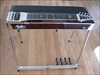
This is the one I'll be using when I finish my studio - a Tascam US-2000. I have been using a Tascam US-1641 for the last 6 years in our band for the audio interface from my laptop. It's worked flawlessly every time.
Tascam make great products - they're not inexpensive but they are extremely reliable and work great.
Here is the new one for my studio.

Here's the link to Tascam audio interface products in case anyone is interested.
http://tascam.com/applications/pro_audi ... interface/
Tascam make great products - they're not inexpensive but they are extremely reliable and work great.
Here is the new one for my studio.
Here's the link to Tascam audio interface products in case anyone is interested.
http://tascam.com/applications/pro_audi ... interface/
-
Richard Delucchi
- Posts: 69
- Joined: 22 May 2012 6:42 pm
- Location: California, USA
recording
an audio interface has audio to digital converters innother word it tuns your analog signal into digital so your computer can read it. the better the converters the better the sound you will end up with. i would never run my psg directly into my board. try a shure sm57 in front of your amp. do not use phantom power with this mic. you should get a good sound the shure is hard to overdrive. i use a lynx 16 in and 16 outs for my interface it's a great interface piece of gear but is rather costly. be happy to answer any question you have about recording.
-
Richard Delucchi
- Posts: 69
- Joined: 22 May 2012 6:42 pm
- Location: California, USA
recording
an audio interface has audio to digital converters innother word it tuns your analog signal into digital so your computer can read it. the better the converters the better the sound you will end up with. i would never run my psg directly into my board. try a shure sm57 in front of your amp. do not use phantom power with this mic. you should get a good sound the shure is hard to overdrive. i use a lynx 16 in and 16 outs for my interface it's a great interface piece of gear but is rather costly. be happy to answer any question you have about recording.