CD's to Tracks
Moderator: Shoshanah Marohn
-
Billy McCombs

- Posts: 1215
- Joined: 22 Aug 2007 11:13 am
- Location: Bakersfield California, USA
CD's to Tracks
Is there a free program that will remove vocales from CD's so you can use them for tracks?
78 Emmons PP,Great tone.82 Emmons SKH #56
-
Donny Dennis

- Posts: 242
- Joined: 17 Jun 2005 12:01 am
- Location: Atlanta, Texas
-
Michael McGee

- Posts: 922
- Joined: 8 Dec 1998 1:01 am
- Location: Everton, Missouri, USA
Billy, you may already know the process involved that makes this possible, but IMHO it is definitely NOT a 'magic bullet'. Don't let your expectations get very high as far as creating good tracks.
Most programs use an algorithm that tries to measure what instruments have been panned left or right versus instruments that were mixed with equal amounts of volume on both the left and right channels. The algorithm tries to hide what's in the middle, and some of these programs do a good job of masking any sound 'in the middle'.
It has been common mixing practice for many, many years to put the vocal 'in the middle' - equal amounts of volume in the left speaker and right speaker. Your ears tell you that the vocal is 'centered'. So the program masks the vocals.
However, it has also been common practice for many years to put the bass instrument and the kick drum 'in the middle'. Unless the program has a low pass filter, your 'new' track will have no vocals and NO LOW END.
In recent years, it seems to my ears that there is much less hard panning to the left or right than there was in the 50's, 60's, and 70's. This could cause the program to basically zap almost everything on a recent recording.
Good luck with your efforts. Just remember - "there ain't no free lunch"!
Most programs use an algorithm that tries to measure what instruments have been panned left or right versus instruments that were mixed with equal amounts of volume on both the left and right channels. The algorithm tries to hide what's in the middle, and some of these programs do a good job of masking any sound 'in the middle'.
It has been common mixing practice for many, many years to put the vocal 'in the middle' - equal amounts of volume in the left speaker and right speaker. Your ears tell you that the vocal is 'centered'. So the program masks the vocals.
However, it has also been common practice for many years to put the bass instrument and the kick drum 'in the middle'. Unless the program has a low pass filter, your 'new' track will have no vocals and NO LOW END.
In recent years, it seems to my ears that there is much less hard panning to the left or right than there was in the 50's, 60's, and 70's. This could cause the program to basically zap almost everything on a recent recording.
Good luck with your efforts. Just remember - "there ain't no free lunch"!
-
John Roche

- Posts: 2212
- Joined: 2 Feb 2006 1:01 am
- Location: England
Try this.....http://www.youtube.com/watch?v=PqXiKYG3J7M
-
Dean Salisbury
- Posts: 260
- Joined: 31 Oct 2007 6:44 am
- Location: New York, USA
reducing vocal on mp3's
AUDACITY RIP INSTRUMENTAL OR VOCAL OFF A mp3! Or go to:
http://www.youtube.com/watch?v=PqXiKYG3J7M
1. DRAG AND DROP AN MP3 (IMPORT MP) INTO AUDACITY
2. SELECT THE DOWNWARD ARROW IN MP3 AND SELECT: SPLIT STERO TRACKS
3. SELECT ON THE 2ND TRACK IT SAYS RIGHT AND CLICK ANYWHERE AROUND WHERE IT SAYS RIGHT, THEN IT WILL GRAY OUT CERTAIN PARTS OF THE TRACK.
4. THEN GO TO EFFECTS AND SELECT "INVERT" ONE LAST STEP
5. YOU GOT TO SET BOTH TRACKS TO MONO, SELCT THE DOWN ARROW ON EACH TRACK AND SELECT MONO, YOU HAVE TO DO THIS ON BOTH TRACKS!
YOUR SOUND WILL BE THERE BUT BARELY THERE. However, there is one more step you can take to make the vocal a little further reduce the audio track and loses data on the softest parts which will further reduce the audio track.
save the file and re-open it and first select file then go back to effects and then select amply then save again. sometimes you can do this a couple of times and reduce even more. Sometimes it works and
some times it don't! thats the best results!
I just did it and it does work pretty good. 1 song I got 99% of the vocal out, I could just very very here it the other one I did I got about 96% of the vocal out. Guess just depends upon the mp3.
I did buy a unit years ago that did the same thing but it cost me several hundred bucks and you still could hear the vocals. AUDACITY I think has better results then the expensive unit I had bought in the late 90's which is now broke!
Dean from NY
http://www.youtube.com/watch?v=PqXiKYG3J7M
1. DRAG AND DROP AN MP3 (IMPORT MP) INTO AUDACITY
2. SELECT THE DOWNWARD ARROW IN MP3 AND SELECT: SPLIT STERO TRACKS
3. SELECT ON THE 2ND TRACK IT SAYS RIGHT AND CLICK ANYWHERE AROUND WHERE IT SAYS RIGHT, THEN IT WILL GRAY OUT CERTAIN PARTS OF THE TRACK.
4. THEN GO TO EFFECTS AND SELECT "INVERT" ONE LAST STEP
5. YOU GOT TO SET BOTH TRACKS TO MONO, SELCT THE DOWN ARROW ON EACH TRACK AND SELECT MONO, YOU HAVE TO DO THIS ON BOTH TRACKS!
YOUR SOUND WILL BE THERE BUT BARELY THERE. However, there is one more step you can take to make the vocal a little further reduce the audio track and loses data on the softest parts which will further reduce the audio track.
save the file and re-open it and first select file then go back to effects and then select amply then save again. sometimes you can do this a couple of times and reduce even more. Sometimes it works and
some times it don't! thats the best results!
I just did it and it does work pretty good. 1 song I got 99% of the vocal out, I could just very very here it the other one I did I got about 96% of the vocal out. Guess just depends upon the mp3.
I did buy a unit years ago that did the same thing but it cost me several hundred bucks and you still could hear the vocals. AUDACITY I think has better results then the expensive unit I had bought in the late 90's which is now broke!
Dean from NY
I'm new and just learning - I know nothing!
-
Billy McCombs
- Posts: 1215
- Joined: 22 Aug 2007 11:13 am
- Location: Bakersfield California, USA
-
Ron !
- Posts: 3860
- Joined: 11 Aug 2004 12:01 am
-
Dean Salisbury
- Posts: 260
- Joined: 31 Oct 2007 6:44 am
- Location: New York, USA
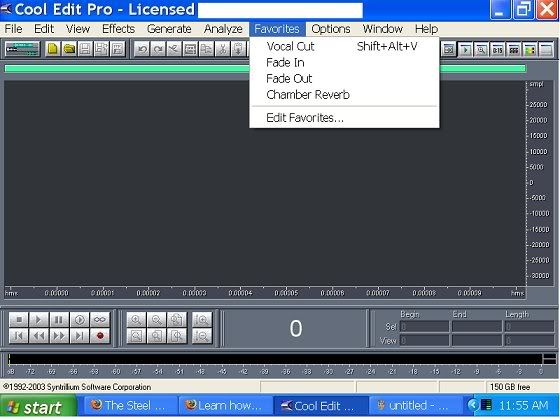
for Ron ! I have cool edit
I have cool edit and I cannot find the option or button to take out the vocal...can you explain how to do that with cool edit?
I'm new and just learning - I know nothing!
-
John Roche
- Posts: 2212
- Joined: 2 Feb 2006 1:01 am
- Location: England
This is a good as you can get using software...http://www.kvraudio.com/get/1651.html
-
Ron !
- Posts: 3860
- Joined: 11 Aug 2004 12:01 am
-
Dean Salisbury
- Posts: 260
- Joined: 31 Oct 2007 6:44 am
- Location: New York, USA
Ron !
Hmm now I am going nutz, lolol i don't have the same screen, your screen shows that have 10 tabs on top. I only have 8 and I don't have "favorite" tab what version are you using I am using version 2.0! lolol
I dont use this program but I wanted to check you the part that removes vocals. lolol I cannot even insert an mp3 into the program so missing I think the encoder! and I bought this program and never installed it until now just to check the vocal thing....
guess I need help! so curious to see if you have the same version
Dean from NY
I dont use this program but I wanted to check you the part that removes vocals. lolol I cannot even insert an mp3 into the program so missing I think the encoder! and I bought this program and never installed it until now just to check the vocal thing....
guess I need help! so curious to see if you have the same version
Dean from NY
I'm new and just learning - I know nothing!
-
Dean Salisbury
- Posts: 260
- Joined: 31 Oct 2007 6:44 am
- Location: New York, USA
finally got mp3 installed and found FAVORITES
finally got where your at and the vocal cut is greyed out! not an option I can select! lolol now driving me nutz again! I must have a newer version then you
I have 2.1
dean nyc
I have 2.1
dean nyc
I'm new and just learning - I know nothing!
-
Dean Salisbury
- Posts: 260
- Joined: 31 Oct 2007 6:44 am
- Location: New York, USA
Ron !
WOW ok after 4 hours finally figured out cool edit! damn I hate these audio programs they all are different all use different terminology. and your right as well you still hear vocal but it does cut is down 80% or so.
After trying all of the programs that I have appear that they all reduce the locals or lead instrument about the same you can still hear it
thanks Ron ! but I finally found everything. now to remember what I did lololol
After trying all of the programs that I have appear that they all reduce the locals or lead instrument about the same you can still hear it
thanks Ron ! but I finally found everything. now to remember what I did lololol
I'm new and just learning - I know nothing!