
Audacity info
Moderator: Shoshanah Marohn
-
Al Marcus
- Posts: 9440
- Joined: 12 May 1999 12:01 am
- Location: Cedar Springs,MI USA (deceased)
Audacity info
Hi guys, How do you cut off the superfluous beginning and end of a recording, in Audacity ? I've tried a few things but dosn't seem to take. thanks...al.
Michigan (MSGC)Christmas Dinner and Jam on my 80th Birthday.
My Email.. almarcus@cmedic.net
My Website..... www.cmedic.net/~almarcus
My Email.. almarcus@cmedic.net
My Website..... www.cmedic.net/~almarcus
-
Robert Tripp

- Posts: 465
- Joined: 20 Apr 2009 4:30 pm
- Location: Mesa, Arizona, USA
Drag your cursor to highlight the area you want removed, then click on the scissor icon and save or export. That should do it.
http://www.reverbnation.com/roberttrippmusic
http://www.reverbnation.com/roberttrippgospel
I might be a beginner now, but someday I'm gonna steel the show.
http://www.reverbnation.com/roberttrippgospel
I might be a beginner now, but someday I'm gonna steel the show.
-
Steve English
- Posts: 1411
- Joined: 20 Dec 1999 1:01 am
- Location: Baja, Arizona
-
richard burton

- Posts: 3854
- Joined: 23 Jan 2001 1:01 am
- Location: Britain
Open Audacity recording

Select area that you want to keep (by holding down the left-click button on your mouse, and dragging the cursor over the recording)

Click on 'Edit', then click on 'Trim'

You will then get this:

Click several times on 'Magnify' button

Find the start of your recording

Drag the cursor to shade in the part that you want to delete

Click 'Edit, then click on 'Silence'

You will then get this:

Shade area up to 1/2 a second before music starts, click on 'Edit', then click on 'Delete'

Select area that you want to keep (by holding down the left-click button on your mouse, and dragging the cursor over the recording)
Click on 'Edit', then click on 'Trim'
You will then get this:
Click several times on 'Magnify' button
Find the start of your recording
Drag the cursor to shade in the part that you want to delete
Click 'Edit, then click on 'Silence'
You will then get this:
Shade area up to 1/2 a second before music starts, click on 'Edit', then click on 'Delete'
Last edited by richard burton on 15 May 2009 6:31 am, edited 1 time in total.
-
richard burton
- Posts: 3854
- Joined: 23 Jan 2001 1:01 am
- Location: Britain
Click on 'Fast Forward' button
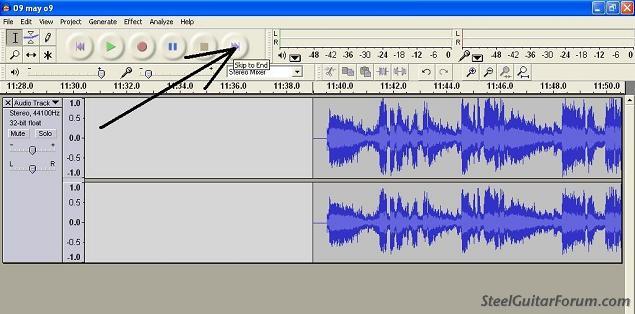
Shade the end portion of the recording that you want to delete

Click 'Edit' and then 'Delete'

Shade last three to four seconds of recording

Click on 'Effect' and then click 'Fade Out'

Click on 'File' then click on 'Export As Wav'

Give your file a name, then press 'Save'

Click on X to close Audacity

Click 'No' to 'Save changes before closing?' (if you have other tunes on the same Audacity recording), or click 'Yes' if that is the only tune on the recording
Shade the end portion of the recording that you want to delete
Click 'Edit' and then 'Delete'
Shade last three to four seconds of recording
Click on 'Effect' and then click 'Fade Out'
Click on 'File' then click on 'Export As Wav'
Give your file a name, then press 'Save'
Click on X to close Audacity
Click 'No' to 'Save changes before closing?' (if you have other tunes on the same Audacity recording), or click 'Yes' if that is the only tune on the recording
-
Al Marcus
- Posts: 9440
- Joined: 12 May 1999 12:01 am
- Location: Cedar Springs,MI USA (deceased)
Wow! Thanks guys for all the good advice, and thanks Richard Burton for all the graphics. This Forum is a good place to be. I knew about the shading, but wasnt able to save it as corrected. Now I do. Thanks again for all your help...al.:) 

:) Michigan (MSGC)Christmas Dinner and Jam on my 80th Birthday.
My Email.. almarcus@cmedic.net
My Website..... www.cmedic.net/~almarcus
My Email.. almarcus@cmedic.net
My Website..... www.cmedic.net/~almarcus
-
Robert Tripp
- Posts: 465
- Joined: 20 Apr 2009 4:30 pm
- Location: Mesa, Arizona, USA
I tried to put up some graphics, but couldn't seem to get it accomplished. Anyone give me some tips on the print screen function and how to paste those grapics into a msg?
http://www.reverbnation.com/roberttrippmusic
http://www.reverbnation.com/roberttrippgospel
I might be a beginner now, but someday I'm gonna steel the show.
http://www.reverbnation.com/roberttrippgospel
I might be a beginner now, but someday I'm gonna steel the show.
-
robert kramer
- Posts: 2110
- Joined: 27 Nov 1999 1:01 am
- Location: Nashville TN
-
Michael Maddex
- Posts: 1140
- Joined: 18 Apr 2007 5:02 pm
- Location: Northern New Mexico, USA
Robert, if you post this question over in the Computers section and mention what operating system you are using, I'll bet that you get a prompt response. I'd answer it here myself, but I'm guessing that you're using some OS from MS and I don't have clue about their products.Robert Tripp wrote:... Anyone give me some tips on the print screen function and how to paste those graphics into a msg?
HTH.
"For every expert, there is an equal and opposite expert." -- Arthur C. Clarke
-
Charlie McDonald
- Posts: 11065
- Joined: 17 Feb 2005 1:01 am
- Location: out of the blue
-
Robert Tripp
- Posts: 465
- Joined: 20 Apr 2009 4:30 pm
- Location: Mesa, Arizona, USA
Thanks for the reply Michael.
http://www.reverbnation.com/roberttrippmusic
http://www.reverbnation.com/roberttrippgospel
I might be a beginner now, but someday I'm gonna steel the show.
http://www.reverbnation.com/roberttrippgospel
I might be a beginner now, but someday I'm gonna steel the show.